🌐 Baca halaman ini dalam Bahasa Malaysia: Kiosk Imbas MyKad untuk Hospital di Malaysia.
Registration is the first bottleneck in almost every Malaysian hospital and clinic. Patients queue just to hand over their details, staff re-key the same information by hand, and a single mistyped IC number can follow a patient through their entire visit. An IC scanning kiosk removes that bottleneck: the patient simply inserts their MyKad, their details are read straight from the card chip, and they are registered and issued a queue number in seconds.
What is an IC scanning kiosk?
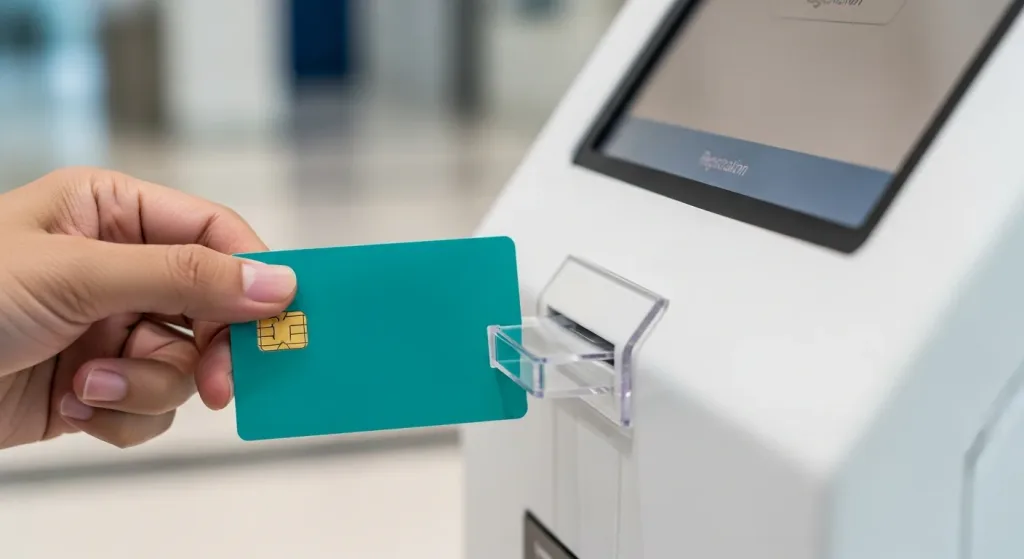
An IC scanning kiosk is a self-service registration terminal fitted with a smart-card reader that reads a Malaysian MyKad. Instead of filling in a form or dictating details at a counter, the patient inserts their IC, the kiosk reads the identity data stored on the card chip, and the patient is checked in automatically. It is most commonly used in hospitals, specialist clinics and health screening centres, where accurate patient identification and fast registration matter most.
How the MyKad scanning kiosk works
- The patient walks up to the kiosk and selects their department or purpose of visit.
- They insert their MyKad into the card slot.
- The kiosk reads the identity details from the card chip and matches or creates the patient record.
- The patient confirms the details on the touchscreen.
- A queue ticket is issued, printed or sent to their phone, for the correct department.
- The patient waits comfortably and is called by the queue display and SMS alerts.
Benefits of IC self-registration for hospitals
- Faster registration — no paper forms and no manual typing.
- Accurate patient data — details come straight from the MyKad chip, eliminating IC-number typos.
- Shorter counter queues — patients self-register, freeing staff for clinical work.
- Contactless and hygienic self-service, ideal for busy healthcare settings.
- Consistent records that flow into your existing hospital systems.
- Always available, even at peak hours when counters are full.
Built for hospital queues in Malaysia
The IC scanning kiosk is part of the Qtech hospital queue management system, so registration and queueing happen in a single step. After scanning their IC, patients are routed to the right department, issued a ticket, and kept informed by digital signage displays and SMS notifications. Patients who prefer not to use the kiosk can join the same queue by scanning a QR code or at a self-service touchscreen kiosk.
Languages and accessibility
Like the rest of the Qtech kiosk range, the IC scanning kiosk supports multiple languages, including Bahasa Malaysia and English, so every patient can self-register comfortably. The interface uses large, guided on-screen prompts to keep registration simple for all ages.
Frequently Asked Questions
What is an IC scanning kiosk?
An IC scanning kiosk is a self-service registration terminal with a smart-card reader that registers a patient by reading their Malaysian MyKad, then issues a queue ticket.
How does a patient register with their IC?
The patient inserts their MyKad into the kiosk. The kiosk reads the identity details from the card chip, checks the patient in, and prints or sends a queue number.
Is the IC scanning kiosk only for hospitals?
It is most common in hospitals, specialist clinics and health screening centres, but any service that identifies people by IC can use it.
Does it work with the queue management system?
Yes. Registration and queueing happen in one step, and patients are then kept informed by digital displays and SMS notifications.
What languages does the kiosk support?
Multiple languages, including Bahasa Malaysia and English, configurable for each location.
How much does an IC scanning kiosk cost?
Pricing depends on hardware and configuration. Contact Qtech for a quote.
Ready to cut hospital registration queues? Talk to Qtech about an IC scanning kiosk tailored to your facility.